An appointment booking answering service that books the time before your caller hangs up

Most answering services end the call with "someone will get back to you." BookedUp ends it with a time. It reads your live calendar, offers slots that fit the service and the person, books the one the caller picks and emails them the invite.

Set up in about 2 minutes. Cancel before day 14 and you pay nothing.

A stylist working on a client's hair while her phone lights up on the counter

Why "we'll call you back to schedule" loses the booking

A message-taking service gets you a name, a number and a vague request. Then the scheduling starts: phone tag, voicemail, and a customer who has already found someone else.

Callbacks become phone tag
You call back between clients, they're at work. They call back, you're with a client. Three tries later the appointment that was a sure thing has gone cold.
The service doesn't know your book
An operator can't see that Thursday is full or that a color takes three hours. So they can't commit, and a caller who wanted a time gets a maybe.
Ready-to-book callers book whoever answers
Someone calling to book has already decided to spend money. If they can't get a time from you on this call, the next business they try gets it.

Example call

A booking with a person, a service and a buffer

A returning client calls a lash studio. The studio has three artists on separate calendars and a 15-minute cleanup buffer after every fill.

  1. BookedUp

    Thanks for calling Studio Ember. This is an AI assistant, and this call may be recorded. Hi Hannah, how can I help today?

  2. Caller

    Hi! I need a lash fill. Is Jess around next week?

  3. BookedUp

    She is. A fill is 75 minutes, and Jess has Tuesday at 11 or Thursday at 1.

  4. Caller

    Thursday at 1.

  5. BookedUp

    Done: a lash fill with Jess, Thursday at 1. I'll email the confirmation and a calendar invite to the address we have for you.

  6. Caller

    Perfect, thank you.

Booked with the requested artist, buffer respected, invite emailed

Illustrative call. Studio Ember is a fictional business.
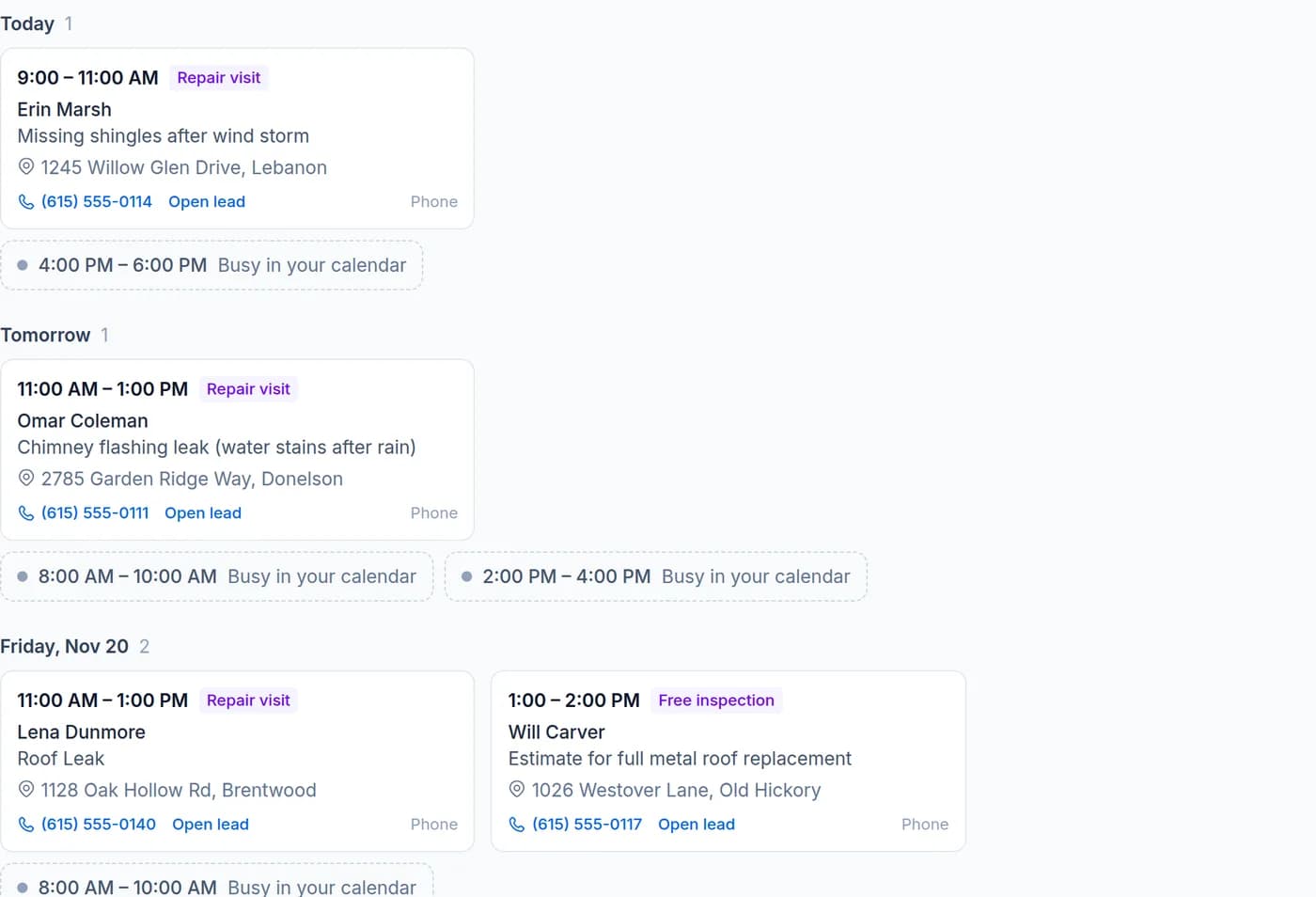
BookedUp appointments list with booked visits and busy calendar time
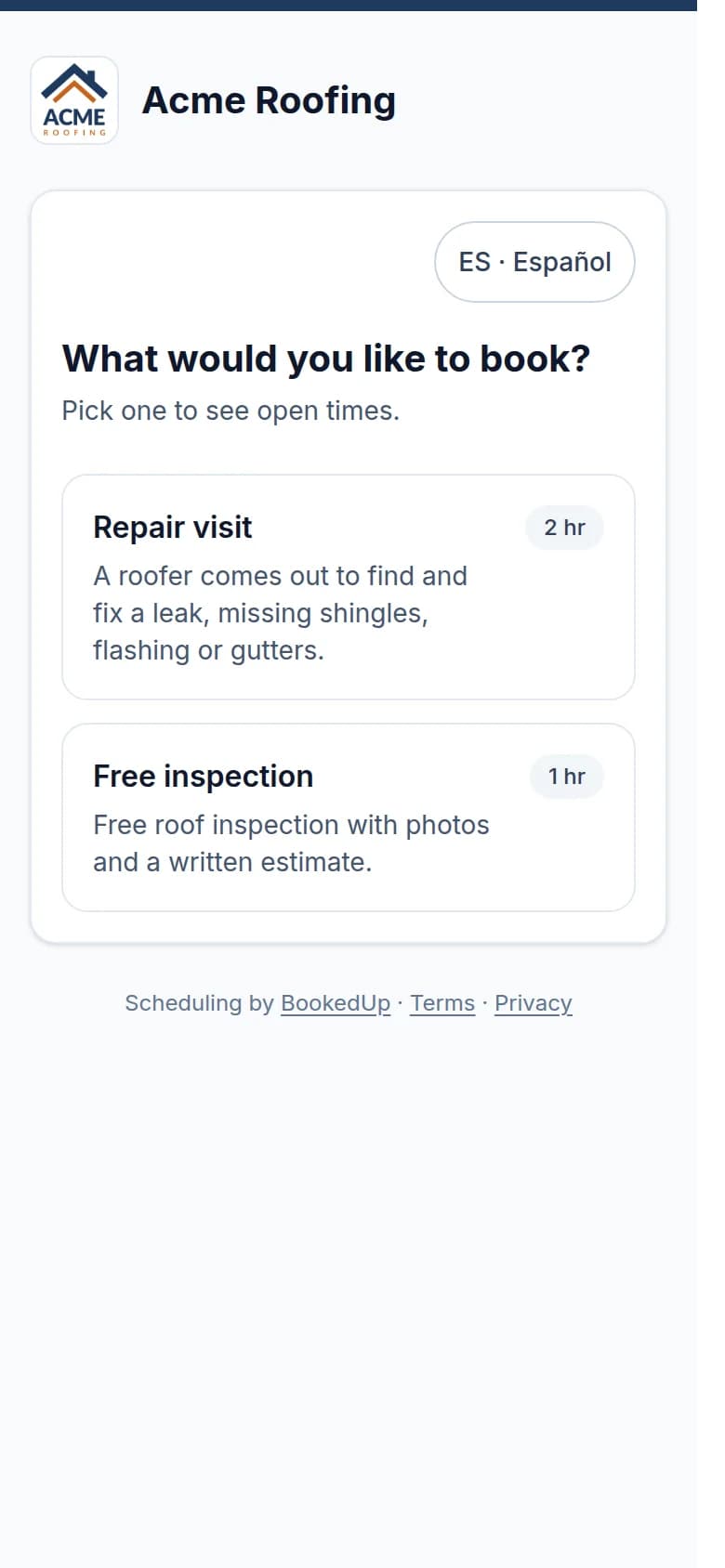
A BookedUp booking page on a phone, with services and open times

Real BookedUp screens from our demo account. Acme Roofing is a fictional demo business.

Booking built in, not bolted on

Your calendar, read live, written both ways

Connect Google or Apple (iCloud) Calendar. Before it offers a time, the receptionist checks that calendar for busy time, including jobs other tools sync into it, and only offers windows inside your hours and the appointment type's rules.

Delete or move a BookedUp appointment in your calendar and BookedUp follows. Holidays and closures you add are respected on the phone and on your booking page.

  • Google and Apple Calendar today; Outlook*
  • Closures and holidays respected
  • Confirmation email with a calendar invite
BookedUp appointments list with booked visits and busy calendar time

Real BookedUp screens from our demo account. Acme Roofing is a fictional demo business.

Appointment types with real rules

Set up each thing you book: a consultation, a 75-minute fill, a two-hour install. Each has its own length, buffers before and after, and the hours it can be booked. The receptionist works out which one the caller needs and offers times that fit it.

The same types power a branded booking page for your website, where customers can also reschedule or cancel on their own.
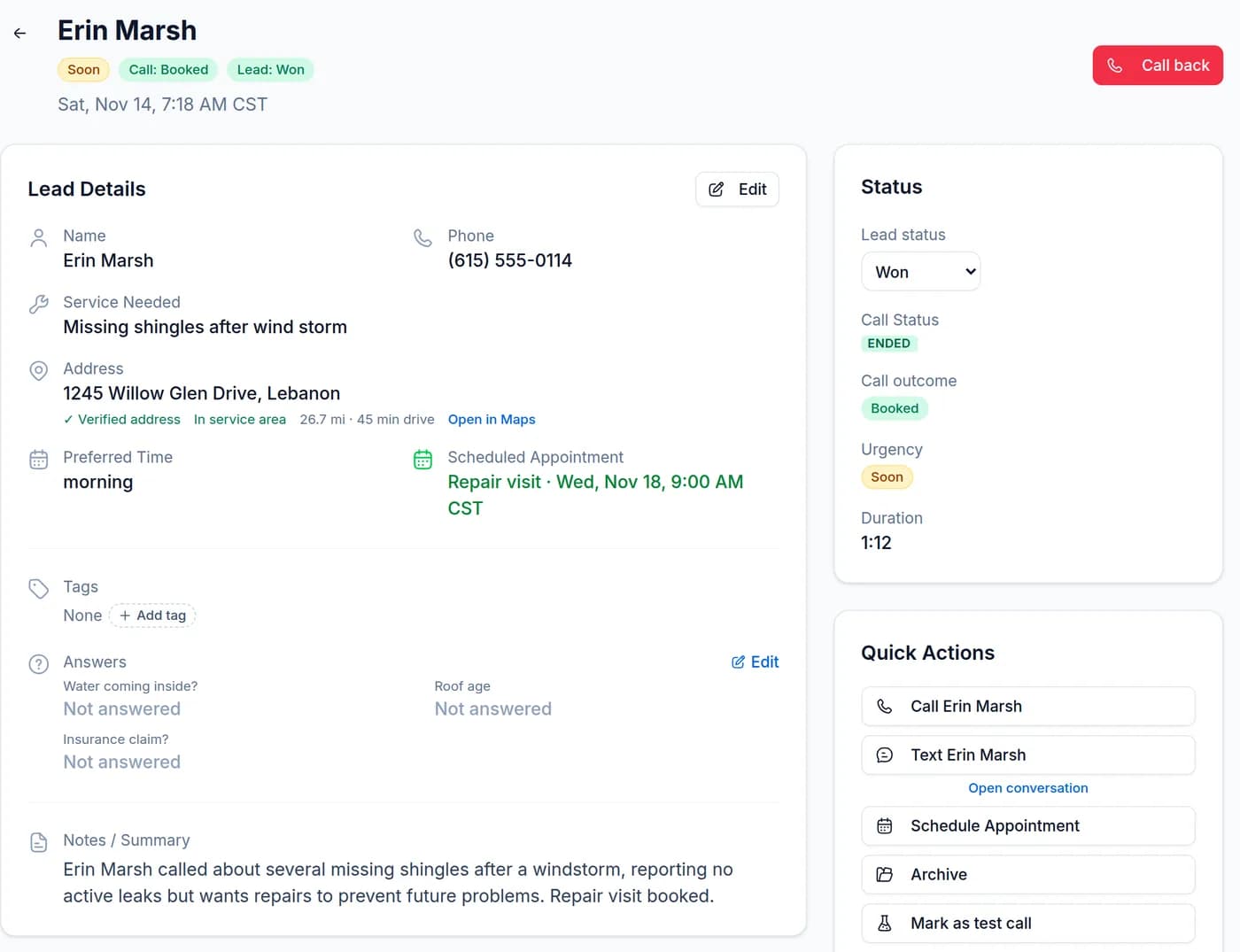
A BookedUp lead with a verified address, service-area check and the scheduled appointment
A BookedUp booking page on a phone, with services and open times

Real BookedUp screens from our demo account. Acme Roofing is a fictional demo business.

Team calendars: a person, or whoever's free

Callers can ask for someone by name or take the first opening. You choose round-robin or priority order. Plans include 1 calendar on Starter, up to 5 on Pro and 15 on Business.

Customers' AI assistants can book you, too

People increasingly ask ChatGPT, Claude and other assistants to find and book local services. BookedUp businesses are listed for those assistants, which can check your open times and request one. The time is held for 30 minutes and booked only when your customer confirms from the email we send them. On by default; turn the listing off in Settings.

Also on every plan

See every feature →
  • Every call, 24/7Nights, weekends and the lunch rush. Your business name, your greeting, one of six natural voices.
  • Remembers repeat callersGreets returning customers by name and skips what it already knows, without reading private details back.
  • Right address, right areaVerifies the address with Google Maps and checks drive distance against your service area before booking.
  • Live transfersHands emergencies or VIP calls to you or your team, with per-person rules and hours. Takes a message if no one picks up.
  • Alerts where you areEmail, push, text* and an in-app inbox, plus Slack, Discord or Telegram. Route to your team with plain-English "only if" rules.
  • Texts your customers*The AI sends confirmations and text-backs, then answers replies on its own: questions, rescheduling, cancelling. Every text is saved in your dashboard.

* Coming soon. Rolling out to every plan at no extra cost. See the roadmap.

How booking by phone gets set up

  1. Connect your calendar

    Google or Apple. Busy time is read live; nothing is copied by hand.

  2. Add appointment types

    Name, length, buffers and bookable hours for each service. Assign who can do which.

  3. Book a test appointment

    Call your BookedUp number and book yourself. Watch it land on your calendar.

  4. Forward your line

    All calls or only missed ones. Every new booking alerts you, and the customer gets the invite.

Try to book yourself in

Our demo line is the real receptionist for a made-up roofing company. Ask for an inspection next week and see whether it gets you a time.

Call (615) 570-0096, then see your call in a live dashboard: the receptionist gives you a code for getbookedup.ai/try. Calls are recorded; your dashboard copy is private and deleted after 3 hours.

Demo line, answered by the real receptionist

(615) 570-0096

No phone handy? .

Booking is included on every plan

No booking add-on and no per-appointment fee. Every receptionist feature is on every plan, from $49.99/month. Plans differ by minutes, team size and locations.

Starter

For solo pros

$49.99/mo

or $499.90/year, 2 months free

250 minutes, about 80 calls

1 calendar

  • 24/7 AI receptionist, English + Spanish
  • Live booking on your Google, Apple or Outlook* Calendar
  • Appointment types + branded booking page
Most popular

Pro

For busy shops

$99.99/mo

or $999.90/year, 2 months free

500 minutes, about 165 calls

Up to 5 team calendars

  • 24/7 AI receptionist, English + Spanish
  • Live booking on your Google, Apple or Outlook* Calendar
  • Appointment types + branded booking page

Business

For multi-crew teams

$199.99/mo

or $1,999.90/year, 2 months free

1,000 minutes, about 330 calls

15 team calendars included, more as add-ons

  • 24/7 AI receptionist, English + Spanish
  • Live booking on your Google, Apple or Outlook* Calendar
  • Appointment types + branded booking page

See full plan details and minute packs

Appointment booking answering service: questions

With Google or Apple Calendar connected, it books it: it offers real open times, the caller picks one, and it goes on your calendar during the call. If no calendar is connected, it takes a detailed request instead and you confirm.

No. It checks your calendar's busy time first, including events other apps sync into it, and only offers times inside your hours, your closures and the appointment type's length and buffers.

Google Calendar and Apple iCloud Calendar today. Outlook Calendar is coming soon*. If your scheduling software syncs to Google or Apple Calendar, the receptionist sees those appointments as busy time.

Yes. Callers can ask for someone by name or take the next opening, and you can use round-robin or priority order for "anyone". Starter includes 1 calendar, Pro up to 5 and Business 15.

Not yet by voice. If a caller asks to move or cancel an existing appointment, the receptionist takes a note and your team confirms. Customers can reschedule or cancel themselves from the booking page link in their confirmation email, and rescheduling by text is coming with texting*.

When the caller gives an email address, they get a confirmation email with a calendar invite. You get an alert with the booking details. Text confirmations are coming soon*.

Yes. Each appointment type has its own length, buffers before and after, and bookable hours. The receptionist figures out which one the caller needs before it offers times.

You get a branded booking page with the same appointment types and rules, for your website or social profiles. Customers' AI assistants can also request a time, held for 30 minutes until the customer confirms by email.

If you'd rather confirm every booking yourself, don't connect a calendar: the receptionist takes the request with the caller's preferred times and you confirm. You can connect a calendar later, once you've heard a few calls.

Start the 14-day trial, connect a calendar, and call your own number to book a test appointment. It's on your calendar before you hang up.

Book it on the first call

Your calendar, your services, your team, filled while you work. No callbacks, no phone tag.

Start my free 14-day trial

Set up in about 2 minutes. Cancel before day 14 and you pay nothing.